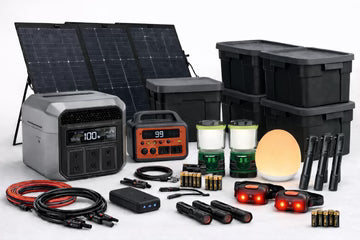
Power & Lighting
Power & Lighting
Emergency Power Is For Light, Information, And Decisions.
When the grid goes down, power becomes more than convenience. It becomes light, communication, information, and control.
This is not a whole-house backup plan. It is a quiet indoor system for essential loads, controlled lighting, device charging, and emergency information.
The goal is simple: keep the household functional without wasting stored energy or creating unnecessary visibility.
Silent power. Controlled light. Essential devices first.
The First Rule Of Emergency Power
Stored power is limited. Treat it like fuel.
Use it first for the things that keep the household safe and clear-headed: lighting, phones, radios, headlamps, small medical devices if needed, and essential communication tools.
Dead phones, dead radios, darkness, confusion, and rushed decisions create pressure inside the home.
Power should support decision-making first. Comfort loads come last.
How This Power System Works
This system is built around stored power, layered lighting, controlled charging, backup batteries, and solar recharging when practical.
Light First
Lighting affects safety, movement, food prep, sanitation, stress, and nighttime discipline.
Keep Essentials Charged
Phones, radios, headlamps, and small devices should stay prioritized over entertainment or comfort devices.
Recharge Carefully
Stored power lasts longer when charging windows are planned, solar is used intelligently, and daily use stays low.
Rule: light, information, and communication come first.
Lighting Comes First
Good emergency lighting does not mean bright lighting. It means controlled lighting that lets the home function without wasting energy.
Layer the system with area lights, task lights, headlamps, low-lumen night lights, and backup flashlights.
Every person should have their own light source. The main living area should have at least two independent area lights, plus one dim path light for safe movement at night.
Example lighting options:
Note: Items shown are examples only, not specific recommendations. Some links may be affiliate links and may support the site at no extra cost to you.
 |
 |
 |
 |
 |
 |
Light Discipline
Light can leak information. Bright rooms, silhouettes, window glow, and exterior lights can show that a home is active and powered.
After dark, use low-lumen settings. Aim task lights downward. Avoid bright white light near windows. Use red or dim light where practical for night movement.
Avoid upward-facing lamps, visible shadow movement, exterior-facing glow, exterior lights, and bright rooms when the surrounding area is dark.
Quick test: stand outside at night. If you can see glow, movement, or silhouettes, adjust the lighting.
Interior light should not become an exterior signal.
Example visibility-control and blackout-support supplies:
 |
 |
 |
 |
 |
 |
Stored Power
Stored power replaces the grid for essential indoor loads only.
A good power station should be silent, indoor-safe, useful for USB charging, capable of supporting essential small devices, and stored near communication gear.
A power station is not a generator. If you treat it like one, you will drain it like one.
Battery Reality
Power stations are rated in watts and watt-hours. Watts tell you how fast power can be delivered. Watt-hours tell you how much energy is stored.
A 2000Wh battery can run a 1500W appliance for only about 1 hour and 20 minutes total, but it can run small lights, phones, radios, and efficient devices much longer.
High-heat appliances drain stored power quickly. Use batteries for light, information, communication, and essential devices first.
Example power stations and stored-power options:
 |
 |
 |
 |
 |
 |
Battery Safety And Daily Power Budget
Stored power is only useful if it stays safe, charged, and controlled.
Charge on a stable, non-flammable surface. Keep charging gear away from bedding and soft furniture. Do not cover power stations or power banks while charging. Remove damaged or swollen lithium banks from the system.
Power should be planned, counted, and rationed.
Priority tiers: lighting, phones, and emergency radio first. Laptops, tablets, and small medical devices as needed. Comfort devices last.
Simple rule: charge during one defined window, usually daytime, then stop.
Disciplined households may keep essential lights, phone charging, and radio updates around 100–300Wh per day. Medical devices must be calculated separately.
Long-duration power is not about storing endless electricity. It is low daily use, stored battery capacity, controlled recharging, and backup batteries.
A practical household target is enough battery capacity to run essential lighting, phone charging, and radio use for at least 3–7 days without recharge.
Recharging And Solar Reality
Stored power matters more when it can be replenished.
Basic recharge methods include wall charging when power briefly returns, solar charging to slow depletion, and backup power banks for small-device redundancy.
Battery size determines runtime. Solar capacity determines how well you can replace daily use.
A 2000Wh battery with one 200W solar panel could take roughly 10 hours to refill in perfect sun. Real conditions are rarely perfect.
Southern Ontario may provide roughly 4–6 usable solar hours in summer and 2–3 usable solar hours in winter. Cloud, shade, angle, and charging through glass can reduce output.
Best rule: size solar to replace your daily power use on an average day, not a perfect day.
Example solar-recharge options:
 |
 |
 |
|
 |
 |
Safe Solar Deployment
Solar panels should only be deployed when doing so is safe, useful, and worth the trade-off.
Panels can extend runtime, but they are visible, fragile, weather-exposed, and theft-prone.
Use portable panels. Route cables carefully. Avoid leaving doors or windows open. Bring panels inside at night. Balance charging needs with weather, security, and visibility.
Low-visibility option: place panels just inside a sun-facing window. Output will be reduced, but quiet trickle charging may still extend runtime.
Solar is useful, but it should be deployed with discipline.
Example solar-deployment support:
 |
 |
 |
Cables, Batteries, And Small Parts
Small parts fail more often than batteries do.
Keep a labelled pouch with USB-C cables, Lightning cables if needed, Micro-USB cables if needed, wall adapters, a 12V vehicle adapter, spare AA and AAA batteries, rechargeable cells, a charger, and the connectors your actual devices need.
Best rule: do not let one missing cable disable the system.
Many emergency lights and radios still rely on AA or AAA batteries. Standardize where possible so you are not juggling random cell types in the dark.
If you cannot feed your headlamps, radios, and small lights, the system degrades quickly.
Example cables, batteries, adapters, and power banks:
 |
 |
 |
 |
 |
 |
Communication Continuity
Power exists for two things first: light and information.
If you cannot receive updates, you are more likely to make poor decisions.
Keep one phone charged daily during a short charging window. Keep one dedicated radio or scanner charged or battery-fed. Store one simple battery radio with fresh cells as backup.
Rule: one device stays charged and reserved for updates, not entertainment.
Keep one phone, one radio, charging cables, backup batteries, and a power bank together in the same communication zone.
Power System Check
A power system fails when batteries are dead, cables are missing, lights are uncharged, or solar has never been tested.
Check power banks, cables, lanterns, headlamps, radios, batteries, power stations, adapters, solar panels, and charging locations regularly.
Before winter, set up solar panels and confirm they charge the power station. Run a one-night test using only emergency lights, phone charging, and radio updates. Check light leakage from outside.
After any use: recharge everything, replace batteries, return cables to the pouch, and update the inventory.
Do not wait for an outage to find out your power station is empty, the solar cable is missing, or your lantern is too bright for the room.
Quick Summary
- Power is for light, information, communication, and decisions
- Use stored power for essential loads first
- Light the home in layers, not with bright wasteful lighting
- Each person should have a personal light source
- Keep stored power indoors for essential small devices
- Budget daily power use before you need it
- Plan around watt-hours, not marketing claims
- Use solar or recharge windows to extend runtime
- Deploy solar only when it is safe and worth the trade-off
- Keep batteries, cables, and adapters organized and ready
- Keep a rechargeable AA / AAA backup system for smaller devices
- Control light spill and exterior visibility
- Keep one phone and one radio path working at all times
- Test the system before winter and after every use
A good emergency power system provides light, communication, and information while using energy efficiently.
The best system is quiet, organized, tested, and ready before the outage starts.